
Cryptfs Password1.2.6 - Get APK
You'll be able to download in few seconds.
Publisher Description

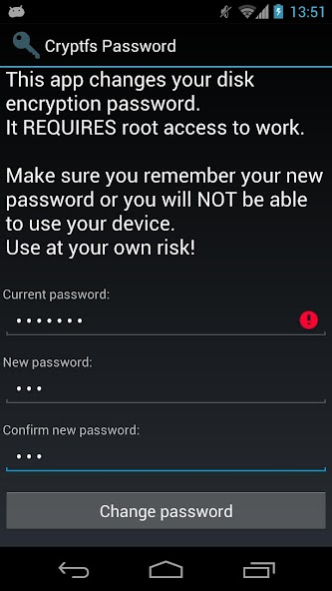
Changes the Android disk encryption password
New: Experimental Lollipop support.
Requires
SuperSU
If you are using a pattern lock, enter the current password as
a sequence of dot numbers.
Dots are numbered left-to-right, top-to-bottom, starting with 1:
1 2 3
4 5 6
7 8 9
This tool REQUIRES root access to work. If you are not using disk encryption this tool will not be useful to you. In fact, it will not even start on your device.
*** WARNING ***
If you forget the new password after you change it, you will not be able to boot the device. You will have to perform a factory reset, DELETING all your data. Make sure you take a full backup before using this tool, and REMEMBER THE PASSWORD. You have been warned, use at your own risk!
Android 3.0 (Honeycomb) introduced disk encryption and it has been available on all subsequent versions. It encrypts the data partition with a key protected by a user-selected password and requires entering the password in order to boot the device. However, Android uses the device unlock password or PIN as the device encryption password, and doesn't allow you to change them separately. This effectively forces you to use a simple password, since you have to enter it each time you unlock your device, usually dozens of times a day. This tool allows you to change the encryption password to a more secure one, without affecting the screen unlock password/PIN. To change the device encryption password simply:
1. Enter the current password
(initially the same as the unlock password/PIN)
2. Enter and confirm the new password
3. Hit 'Change password'
The changes take effect immediately, but you will only be required to enter the new password the next time you boot your device. Make sure you choose a good password, not based on a dictionary word, since automated tools can brute force a simple password in minutes. Above all, make sure you REMEMBER the new password.
If you change the device unlock password/PIN, the encryption password will be automatically changed as well. You need to use this tool again to change it back, if required.
More details and some background information here:
http://nelenkov.blogspot.com/2012/08/changing-androids-disk-encryption.html
Not supported on Android L, but may not be required due to changes to disk encryption implementation.
More details about Android L:
http://nelenkov.blogspot.com/2014/10/revisiting-android-disk-encryption.html
This tool is open source. Code is available on Github under the Apache 2.0 license.
https://github.com/nelenkov/cryptfs-password-manager
Tested on Galaxy Nexus with
* stock Jelly Bean (4.1.1)
* CyanognenMod 9 (4.0.4)
NO WARRANTY. Use at your own risk.
About Cryptfs Password
The company that develops Cryptfs Password is Nikolay Elenkov. The latest version released by its developer is 1.2.6.
To install Cryptfs Password on your Android device, just click the green Continue To App button above to start the installation process. The app is listed on our website since 2016-04-17 and was downloaded 0 times. We have already checked if the download link is safe, however for your own protection we recommend that you scan the downloaded app with your antivirus. Your antivirus may detect the Cryptfs Password as malware as malware if the download link to org.nick.cryptfs.passwdmanager is broken.
How to install Cryptfs Password on your Android device:
- Click on the Continue To App button on our website. This will redirect you to Google Play.
- Once the Cryptfs Password is shown in the Google Play listing of your Android device, you can start its download and installation. Tap on the Install button located below the search bar and to the right of the app icon.
- A pop-up window with the permissions required by Cryptfs Password will be shown. Click on Accept to continue the process.
- Cryptfs Password will be downloaded onto your device, displaying a progress. Once the download completes, the installation will start and you'll get a notification after the installation is finished.
Program Details
System requirements
Download information
Pricing
Version History
version 1.2.6
posted on 2016-04-17
v1.2.6,* CM13 support (thanks @xmikos),v1.2.5,* Android M support,* Better CyanogenMod detection,v1.2.4,* Support for CyanogenMod 12 without SuperSU,(Thanks to Peter C),v1.2.3,* Experimental Lollipop support. Requires SuperSU,v1.2.2,* Limit to Android
version 1.2.1
posted on 2013-03-16
Several fixes and updates
Disclaimer
External Download
We do not host Cryptfs Password on our servers. We did not scan it for viruses, adware, spyware or other type of malware. This app is hosted by Galad and passed their terms and conditions to be listed there. We recommend caution when installing it.
The APK Download link for Cryptfs Password is provided to you by apps112.com without any warranties, representations or guarantees of any kind, so access it at your own risk.
If you have questions regarding this particular app contact the publisher directly. For questions about the functionalities of apps112.com contact us.
